Most professional certifications lapse unless you earn
continuing education every cycle. Each certifying body counts it its own
way, and a plain sum of hours is usually wrong in the direction that
costs you the credential. These tools do the counting.
This page is a working guide to continuing education credits: how
they work, how ten bodies count them, what to keep for an audit and what
usually doesn't count. Registrar, the free tracker further down, does the
arithmetic. Open Registrar or read on.
The problem
Security, fraud, privacy and project-management certifications ask
you to keep learning: so many credits every one to four years, under a
name that changes from body to body (CPE, CEU, PDU). The rules behind
that number are where people get caught:
Caps. Some kinds of activity count only up to a limit per
cycle. Hours past the cap are logged, but they are not credit.
Minimums. A share of the total must come from the core
subject of the credential. General hours cannot make up for it.
Windows and deadlines. Some bodies want credits reported
each year by a fixed date; others want the whole total at the end,
sometimes with a grace period, usually with a fee.
Evidence. Audits ask for certificates long after the
event. A folder of PDFs you cannot match to entries is not much help.
Example. A CISSP needs 120 CPEs in three years,
at least 90 of them in Group A (the CISSP domains), with Group B
(general development) counting for at most 30. Log 80 hours of
domain training and 40 of general development and a spreadsheet says
120 of 120. The real count is 110: ten Group B hours are forfeited,
and Group A is 10 short. More general hours will not fix that.
Body rules change; your body's own portal is always
the authority. More on CPE rules.
In Registrar: the counted total sits next to the
plain sum for every credential, with the forfeited hours and any short
minimum named, so you see the 110 while there is still time to fix it.
Try it with sample data
The two-minute version
If you have just passed your first certification exam, this is the
part to read. Every body has its own vocabulary, but the mechanics are
much the same everywhere.
You earn credits by learning, and you need a set number per
cycle. The cycle is one to four years depending on the body. Some
bodies also set a floor for every year inside the cycle; most only
care about the total at the end.
One hour, one credit, usually. Most bodies award one credit
per hour of qualifying activity. Not all of them: ISACA's CPE hour is
50 minutes, and EC-Council's policy does not tie a credit to a clock
hour at all. Find out before you round anything up.
Domain credits and general credits. Most bodies separate
learning tied to the credential's subject from general professional
development. ISC2 calls them Group A (activity in your
certification's domains) and Group B (the skills around the skills:
leadership, communication, management). The split matters because
general credits are usually capped and domain credits usually have a
floor.
Credits reach your record in one of three ways. Some
providers report them for you: at ISC2, its own events and its listed
CPE Partners can submit on your behalf, which is why conferences ask
for your member number at registration. Others give you a certificate
of attendance to upload yourself. Everything else (a book, a podcast,
a paper, a chapter meeting) you claim yourself, with whatever
documentation you have and a short summary of what you learned. ISC2
asks for that summary on Group A claims.
One activity can count more than once. ISC2 applies credits
it adds to your account to all your ISC2 certifications in their
active cycle (not to one that is in its grace period). EC-Council
applies credits across all the EC-Council certifications you hold.
Between bodies, the same certificate can usually support a claim at
each, if each body's rules accept that kind of activity. You still
report it to each body separately.
In Registrar: log an activity once, tick the
credentials it applies to, and see what it is worth to each under that
body's own rules. Log an activity
Habits that save you
Log it the week it happens. Not in the month your cycle
ends. A week later you still know the title, the hours, the provider
and where the certificate went. Two years later you do not, and two
years later is when the audit letter arrives.
Keep one evidence folder. Every certificate, receipt,
agenda and confirmation email in one place, named so you can match
each file to its entry. Bodies audit, and "I know I went" is not
evidence.
Read your body's handbook once. Cycle lengths, annual
minimums, caps and categories differ from body to body, and they
change. Read the current maintenance policy end to end once, and
again when the body announces a change. For ISC2 that is the
member policies;
the table below links every other body's page.
Grace periods are parachutes, not plans. Many bodies give
you a little time after the cycle ends: ISC2 90 days, CompTIA 30. That
time often comes with a fee or a suspended credential, and some
bodies state no grace period at all. Plan to finish without it.
Touch the system weekly. A spreadsheet, a folder of PDFs, a
portal, this tool: the only tracking system that works is the one you
open every week. Ten minutes on a Friday is enough.
In Registrar: drop in a certificate and the
date, hours, provider and title are read on your device and filled in
for you to check. The file is attached to the entry and hashed, so the
folder and the log cannot drift apart. Attach a certificate
How each body counts
The ten bodies whose rules Registrar knows, side by side. Totals are
for one cycle of one credential; where a body has many credentials the
range is shown with common examples. Each body's entry links to its own
policy page. Tick the bodies you hold to show only those.
Rules change; confirm with your body before you rely
on a number. These figures come from Registrar's rules file,
bodies.yaml, which records where and when each value was
checked.
UNVERIFIED means that value
could not be confirmed on the body's own published pages: it is shown,
but you should check it before you rely on it.
BodyCycleCycle totalAnnual minimumCategories and capsHow you submitPolicy
Caps by activity type, for example work experience at most 9; at least half of a training's content must match the exam objectives. No carryover stated.
How you submit
CE portal. You upload every activity yourself; no one can do it for you. Accepted on upload, audited at random. 30-day grace.
Per-category caps: SANS and GIAC programs 36, other training 18, work experience 12, community participation 12, cyber ranges 12, NetWars 12. No grace period or carryover stated.
How you submit
GIAC account. SANS and GIAC activities are added for you; submit the rest with documents at least 30 days before expiry.
15 to 60; PMP 60, CAPM 15; PMI-CP, PMI-CPMAI and PMI-PMOCP 30 UNVERIFIED
Annual minimum
None
Categories and caps
PMP: at least 35 Education (8 each in Ways of Working, Power Skills and Business Acumen); Giving Back at most 25. PDUs from the final 12 months can carry over (PMP up to 20).
How you submit
CCRS. Approved providers can submit claims for you; ProjectManagement.com reports automatically once linked. From the 2022 handbook.
At least 10 on fraud, at least 2 on ethics; one course can count toward both. Up to 10 extra carry over.
How you submit
Certify compliance at MyCPE by the end of your anniversary month. ACFE keeps no record of your activities: keep your proof for 3 years. A 30-day extension can be requested.
In Registrar: these rules are built in, and the
app flags the same unverified values where they affect your count.
Tick the credentials you hold and add each cycle's start date.
Pick your credentials
Audit-ready records
An audit is a request to prove what you claimed. It can come years
after the activity, and you usually get a fixed window to answer (ACFE
gives 60 days). For each activity, keep:
The certificate or confirmation. A certificate of
attendance, a completion email, a transcript line or a registration
receipt with the agenda. Something with your name on it, from someone
other than you.
The date. The day it happened, not the day you logged it.
It decides which cycle, and which year, the credit belongs to.
The hours. And how you got them: the session times on the
agenda, not the length of the day.
The provider. Who ran it, and their provider number if your
body uses one.
One line on what you learned. It turns a self-claim into
evidence, and it is what ISC2 asks for on Group A claims. Write it the
same week, while you remember.
Where you claimed it. Which credential, which category, and
the date you reported it.
Keep the records for as long as your body says, counted from the
right date: ACFE 3 years, PMI 18 months after the cycle ends, ISACA 12
months after the cycle ends. Keeping everything for the life of the
credential is simpler and costs nothing.
In Registrar: every entry holds these fields
(the notes field takes the "what I learned" line), with the evidence
attached. When the audit letter arrives, export the packet: each
activity laid out in your body's form fields, plus a zip of the
evidence. Export a packet
Common surprises: what usually doesn't count
None of these is universal. Each is a rule at enough bodies to catch
people out, so treat every one as a question for your own body.
Doing your day job. Ordinary work rarely earns credit, and
where it does it is capped low: CompTIA counts work experience up to
9, GIAC up to 12, PMI up to 8 per cycle for PMP. Check your body's rule.
Hours past a cap. They stay in your log and they are not
credit. Ten extra webinars do not help once the category is full.
Check your body's rule.
General hours where a domain floor applies. The CISSP
example above: no amount of Group B fills a Group A gap. Check your
body's rule.
The whole conference day. Credit is for the sessions, not
for travel, meals, breaks or the expo floor. A nine-to-five day is
rarely eight credits. Check your body's rule.
Sales pitches. A product demo or a sponsor session that is
mostly marketing is often excluded, or questioned at audit. Check
your body's rule.
The same thing twice. Repeating a course you already
claimed, or claiming one activity in two cycles. EC-Council, for one,
lets an activity count in only one window. Check your body's rule.
The wrong cycle. Credit usually belongs to the cycle in
which the activity happened. Carryover, where it exists, is limited
(ACFE up to 10; PMI only from the final 12 months). Check your body's
rule.
Rounding up. Forty-five minutes is not an hour, and at
ISACA a CPE hour is 50 minutes. Some bodies accept fractions, some
round down. Check your body's rule.
A claim with nothing behind it. A self-claim with no
documentation can be disallowed at audit, and the credit goes with
it. Check your body's rule.
In Registrar: forfeited hours and short
minimums show as soon as you log, next to the plain sum, so the
surprise comes early instead of at renewal.
See your count
Your first 90 days with a new cert
Week one: find your dates. In the body's portal, note the
cycle start and end, the total, any annual minimum and when the
maintenance fee is due. Work out when the grace period, if there is
one, would end, and then forget it. Make the evidence folder now,
while it is empty.
First month: read the rules. Read the maintenance handbook
once. Write down the caps and floors that apply to you. Give your
member number to the providers you use, so the ones that report
credits for you can. Turn on two-factor sign-in where the portal
offers it.
By day 90: set a pace and a habit. Divide the total by the
months in the cycle: 120 over 36 months is about 3.3 a month; 20 a
year is under 2 a month. Pick one steady source (a chapter meeting, a
monthly webinar series) and put a ten-minute weekly reminder in your
calendar to log what you did.
In Registrar: add the credential with its cycle
start and the app works out pace per month, the deadlines and grace
dates, and a calendar file (.ics) you can import.
Add your credential
Where to earn credits
This list leans toward insider threat and investigations work,
where nearly everything you learn counts somewhere: the field sits
between security, behavioural science, law and investigations. Most of
it serves any security credential.
NITSIG
(National Insider Threat Special Interest Group). Free membership and
the largest network of insider threat practitioners: meetings in the
Washington, DC area (JHU-APL in Laurel, and Herndon), webinars, and
the annual Insider Threat Symposium & Expo. The most
insider-threat-dense hours you can log.
CMU SEI / CERT. The
research group behind much of the field's foundational work, with
paid courses and certificates for program builders and analysts.
CInRM CoE
(Canadian Insider Risk Management Centre of Excellence). Practical
certificates in insider risk management (screening and risk factors,
investigations, organizational integration, OSINT) that build toward
a professional certificate, developed with Carleton University's
Norman Paterson School of International Affairs. Each practical
certificate carries 12 ASIS-recognized CPE credits.
SecureWorld. Regional
conferences worth 6 to 18 CPEs depending on the pass, and free
hour-long Remote Sessions webcasts with downloadable certificates.
GuidePoint GPSEC.
Free one-day regional conferences with insider threat content. Give
your ISC2 number at registration and the credits post for you. The
monthly Brick House webinar adds steady hours.
Gartner. Free
research webinars, plus the Security & Risk Management and IAM
summits. Not an official ISC2 provider: ask for the certificate of
attendance and submit it yourself.
FS-ISAC for the financial
sector, and your local ISC2 and ISACA chapters. Member events and
monthly chapter meetings are quiet, steady sources of credit.
Give some back. Presenting, publishing and volunteering earn
credit at most bodies. Preparing a conference talk counts; so does
writing for, or maintaining, a community resource. Mind the caps: PMI,
for example, counts Giving Back up to 25 of the PMP's 60.
Provider details were current when the source page
was checked in July 2026. Offerings change: confirm eligibility with
the provider and with your body.
In Registrar: log each event the week you
attend; the certificate attaches to the entry, and the packet lays it
out in your body's form fields when you report it.
Log this week's event
Glossary
CPE
Continuing Professional Education. The unit at ISC2, ISACA, GIAC,
EC-Council, IAPP and ACFE. Usually one per hour of activity; at ISACA,
one per 50 minutes.
CEU
Continuing Education Unit. CompTIA's name for its credit. In some
other fields a CEU means ten contact hours, so a CEU at one body is
not automatically one credit at another.
PDU
Professional Development Unit. PMI's unit, one per hour; the
University of Maryland uses the same name for GCITP.
CPD
Continuing Professional Development. The general term, common in
the UK and the Commonwealth, and the name some bodies give their whole
scheme.
Cycle total
The number of credits you need by the end of the cycle (one to
four years).
Annual minimum
A floor you must meet every year inside the cycle, whatever your
total looks like. ISACA (20 a year) and ACFE (20, on a one-year
cycle) have one; ISC2 has one only for Associates.
Group A and Group B
ISC2's split between credits in your certification's domains (A)
and general professional development (B). Other bodies make the same
distinction under other names.
Cap and floor
A cap is the most a category can contribute; a floor is the least
a category must contribute.
Carryover
Credits beyond the requirement moved into the next cycle. Some
bodies allow a limited amount, some none.
Grace period
Time after the cycle ends to finish earning or reporting, often
with a fee or a suspended credential. Not every body has one.
Audit
A request to document what you claimed: certificates, dates,
hours, providers. Usually random, sometimes years later.
In Registrar: every total is shown in the body's
own unit, and every rule behind it is on the Rules screen with its
source. Open the Rules screen
People who hold one or more certifications and renew them
themselves: security analysts, investigators, fraud examiners,
threat-assessment and insider-risk professionals.
Anyone holding two credentials whose cycles, units and caps do
not line up, who wants one record that answers "am I on track for
each?"
People who would rather not hand their training history and
certificates to another online account.
Early release. Registrar works today, but it is
young. The browser version keeps everything on your device; there is
no hosted account version. Some
bodies' rules could not be confirmed against their own published pages;
the app marks those as unverified and does not hide it. Check anything
important against your body's portal.
The suite
Tool #1
Registrar
Track your CPEs, CEUs and PDUs in one place.
Totals that respect each body's caps and category minimums,
and show you what a plain sum of hours would have got wrong.
Evidence files hashed when you attach them and re-checked
before you need them.
A deadline calendar (.ics) for cycle ends, grace periods,
registration windows and fees.
Submission packets: each activity laid out in your body's form
fields, plus a zip of your evidence. You sign in and submit
yourself; Registrar never asks for your portal login.
Drop in a certificate PDF or take a photo: the date, hours,
provider and title are read on your device and filled in for
you to check.
Optional Telegram capture with your own bot (self-hosted).
In your browser: nothing to install and no
account. Your activities and evidence stay in that browser (export a
backup); certificates are read on your device. Self-hosted:
Python 3 standard library only, or one docker compose up;
runs on your own machine or private network, bound to localhost by
default. Both are free software under the GNU AGPL v3.
See it
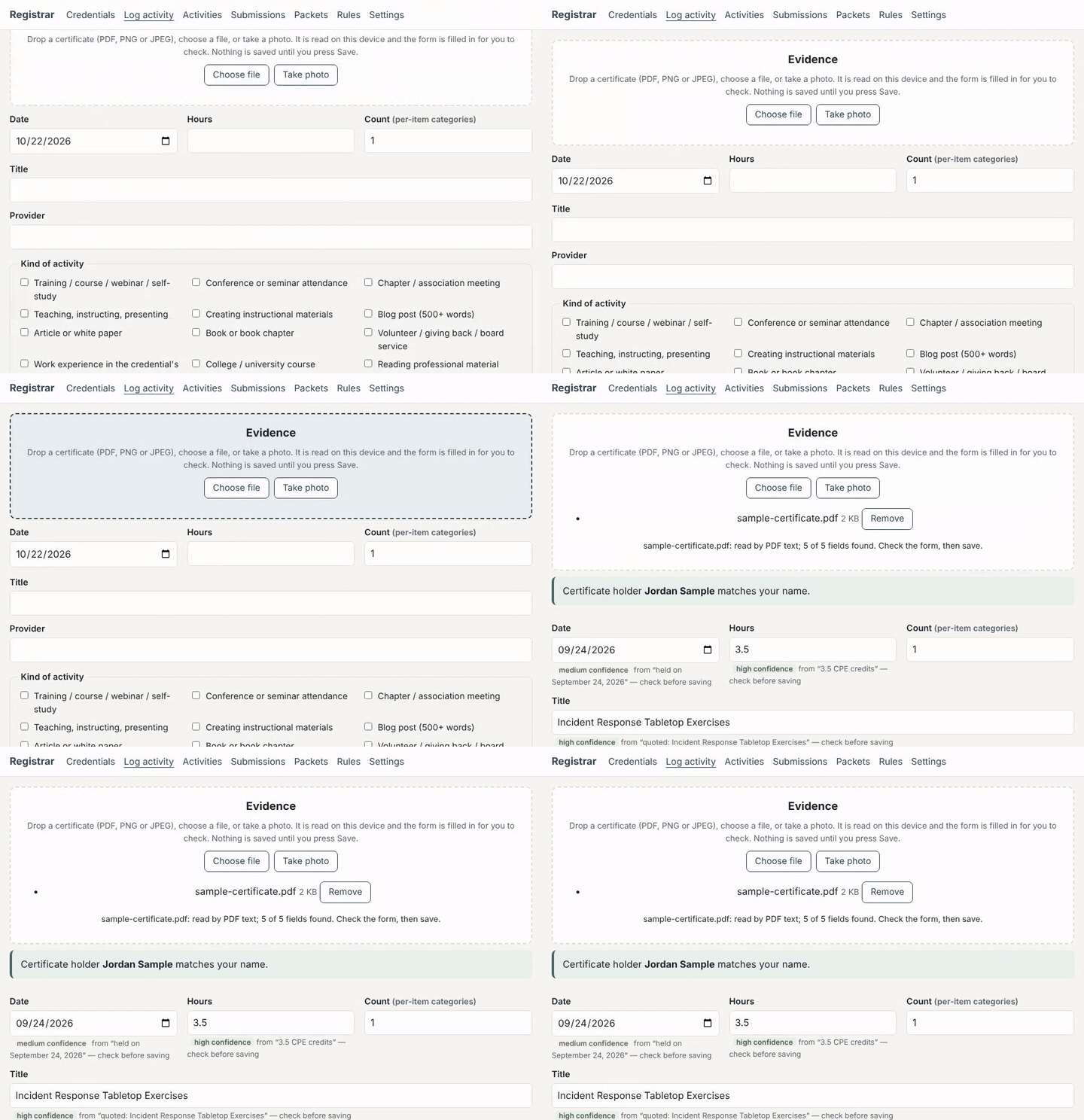
Drop a certificate: the fields are read on your device and
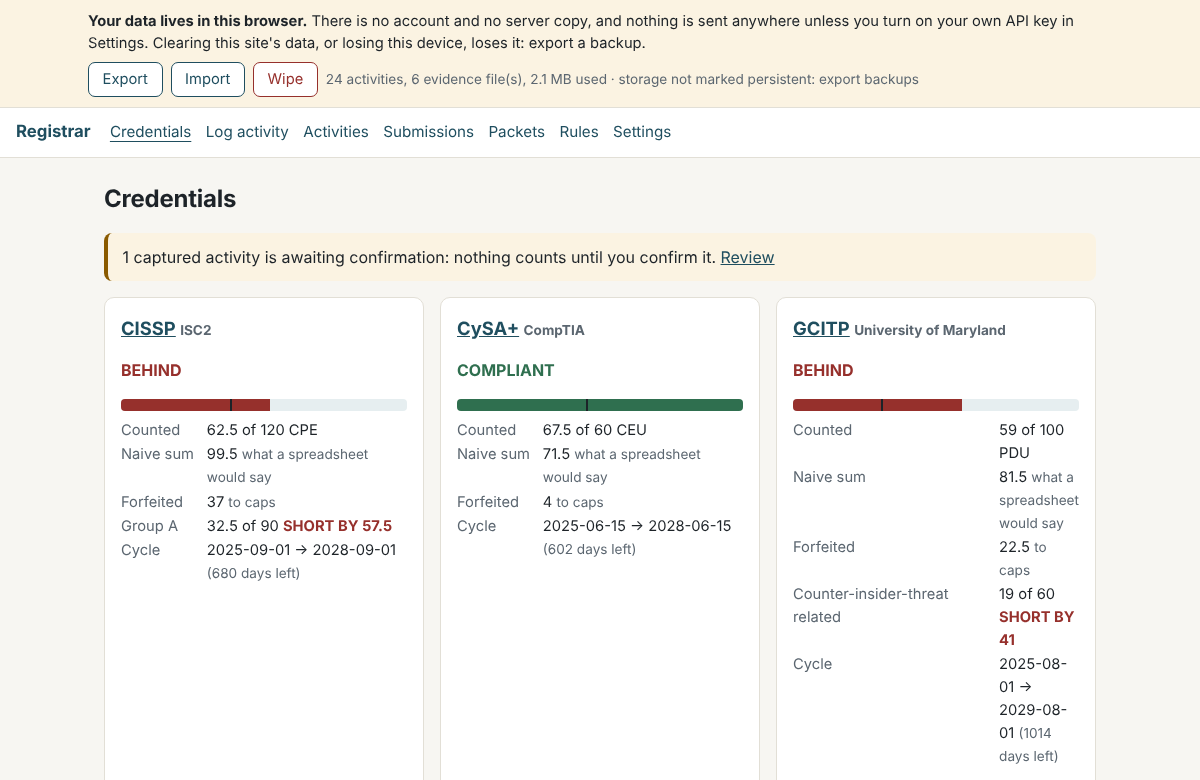
filled in for you to check. Nothing is saved until you confirm.Every credential shows the counted total next to the
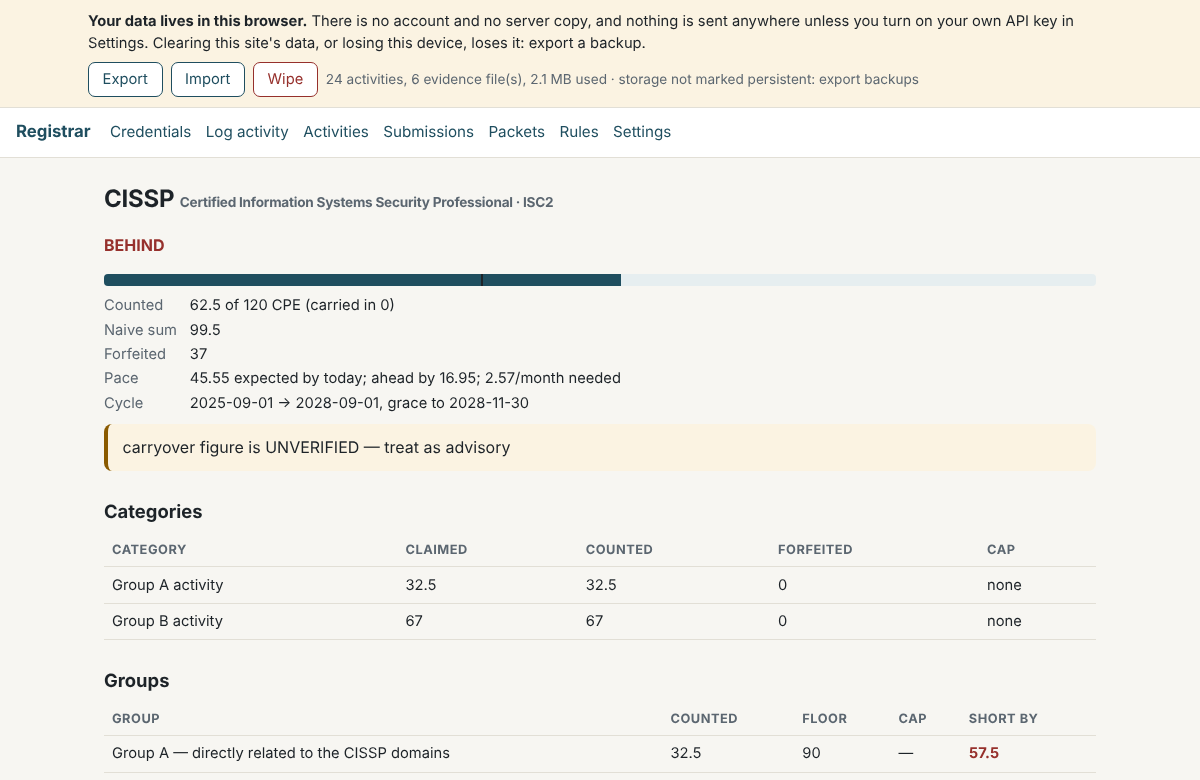
naive sum, and what was forfeited to caps.One credential in detail: pace, grace period, categories
and group minimums. All sample data.
Credentials covered
Registrar counts these seven credentials in full. Every rule lives
in one data file, bodies.yaml, with a source link and the
date it was checked.
UNVERIFIED means that value
could not be confirmed on the body's own published pages: it is shown,
but you should check it before you rely on it.
Credential
Body
Cycle
Requirement
Rules
CISSP
ISC2
3 years
120 CPE (at least 90 Group A, at most 30 Group B)
checked; rollover UNVERIFIED
CySA+
CompTIA
3 years
60 CEU, capped by activity type
checked
CEH
EC-Council
3 years
120 CPE, registered each year by 1 February
checked
GCITP
University of Maryland
4 years
100 PDU (at least 60 counter-insider-threat)
checked; rollover UNVERIFIED
ATAP membership
ATAP
calendar year
1 qualifying meeting
UNVERIFIED
CTM
ATAP
2 years
50 credits; category caps unknown, so advisory only
UNVERIFIED
CFE
ACFE
1 year
20 CPE (at least 10 fraud, at least 2 ethics)
checked
The Rules screen also lists the unit and cycle length
for 95 certifications from ten bodies (ISC2, ISACA, CompTIA, GIAC,
EC-Council, PMI, IAPP, ACFE, ATAP and the University of Maryland), so
you can see how a credential you hold is counted even before its
detailed rules are in.
Your data stays in your browser
The browser app has no account and no server copy. Your
activities, settings and certificates are stored in your browser, on
your device, and nowhere else.
Certificates are read on your device. The PDF reader and the
text-recognition engine come from this site, not from a third-party
server, and the site's security policy stops the app from talking to
any other site.
There are no analytics, no tracking and no cookies. Nothing is
backed up for you either: clearing site data or losing the device
loses the ledger, so use Export now and then.
One optional feature sends data out: if you add your own AI
provider key, the text read from one certificate goes to that
provider when you ask. Never the file, and the key is never saved.
Registrar never asks for, stores or uses your certifying body's
portal login. You submit to your body yourself.
Privacy and threat model: what stays local,
and exactly what the optional AI feature sends and to whom.